12d Synergy delivers cutting-edge data management and project collaboration software for the architecture, engineering, and construction (AEC) industry worldwide. It facilitates access to the latest, most up-to-date information in a centralised environment where all updates are tracked, and historical data is also available. It enables you to collaborate with industry-standard tools, thus simplifying data management across multiple software products.
12d Synergy Components
Some of the basic concepts of 12d Synergy applications are listed here.
Basic Concepts
1.1. File Check Out / In
When working with data, 12d Synergy operates on a 'Check Out' basis. This means that two users cannot edit the same data at the same time. When 'Checked Out', it is locked for editing by other users. Until the user checks the data back in, nobody else can edit it - but they can still read it.
1.2. Servers and Clients
12d Synergy is a client-server application. This means that the 12d Synergy Server houses all the organisational data, and you connect via a 12d Synergy Client application.
This means 12d Synergy could be running on different servers in different locations. You can find out which server you should connect to from your 12d Synergy System Administrator.
1.3. Data Structure
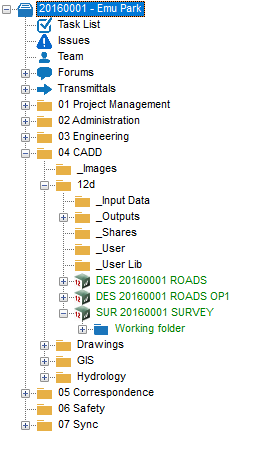
The client-side data structure or tree view of data is displayed below.
1.3.1. Jobs
All data within 12d Synergy is segmented into user-defined jobs, which are logical groupings of work. A job can contain other sub-jobs, task lists, issues, job teams, forums, transmittals, 12d Model Projects, managed folders, and all job-related data. Emu Park in the above image is a job. All data is stored in some form within a single job, but may be shared with other jobs.
1.3.2. Folders
A folder is the basic logical grouping for files, but can also contain subfolders, just like in Windows Explorer. Project Management, Administration, Engineering, etc., are the folders in the image above. There are subfolders in the image above as well, namely Images, 12d, _Input Data, etc.
1.3.3. Managed folders
A managed folder contains files and/or subfolders, and if you want to edit the data it contains, the entire folder must be checked out. This means the entire managed folder must be checked out to modify any of its constituent files or folders. It is displayed as  . The blue-coloured folder, with its name in green font, indicates that it is a managed folder.
1.3.4. 12d Model projects
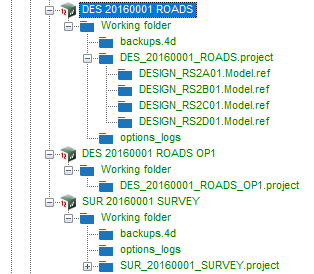
12d Model projects are displayed with the 12d Model logo and the project name in green text, like .png) . These projects are managed folders that contain the Working folder, subfolders and 12d Model files.
. These projects are managed folders that contain the Working folder, subfolders and 12d Model files.
1.3.5. Files
The folders, subfolders, or managed folders hold files such as Microsoft Excel and Word files, .txt files, .dwg files, etc. These files can be viewed or edited, based on the permissions given to the user. Note that a job cannot hold a file directly. A file must be housed in a folder, a 12d Model project working folder or a managed folder under the job.
1.3.6. Task List
.png)
Each 12d Synergy job can contain tasks to describe work that must be completed. A Task List is used by a user with the appropriate permissions to assign tasks to users and track their progress.
1.3.7. Issues
This is a place in the job where issues (problems) can be raised against jobs, files, 12d model projects, and managed folders, and tracked to closure.
.png)
1.3.8. Team
A Job Team is an optional way to manage all team members on a job. The roles are displayed and assigned to team members here. The Team roles can then be used on the job to grant permissions and facilitate role-based notifications. The Teams tab also provides quick access to email communication with the whole team.
1.3.9. Forums
A collaborative platform for users to communicate and discuss ideas.
1.3.10. Transmittals
This is an in-built secure data transmission tool that groups files into file sets and transmits them to both internal and external Synergy contacts.
1.4. Permissions
Permissions are controlled by your system or job administrators. Not everything in 12d Synergy may be visible to you, and you may only have read access to certain parts of the system.