Click the Windows Start button and type Environment Variables in the search bar.
The following two options are displayed.
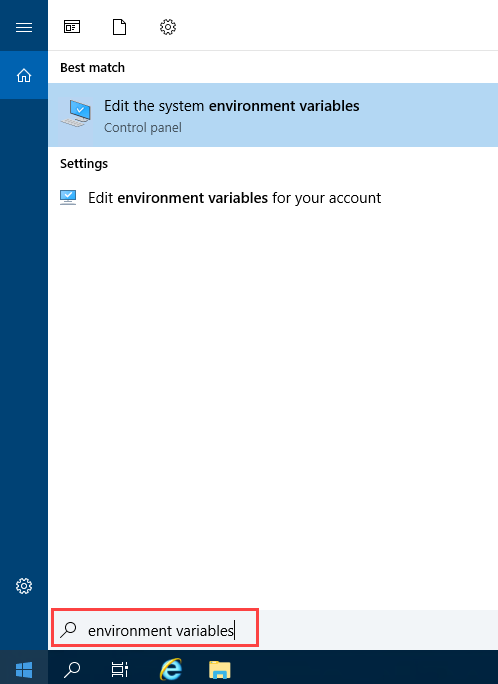
Select Edit the System Environment Variables option.
The System Properties prompt is displayed.In the Advanced tab, click the Environment Variables button.
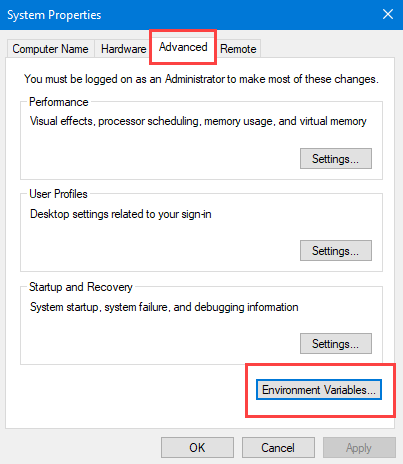
The Environment Variables prompt is displayed.
.png)
Click the New button.
The New System Variable prompt dialog is displayed.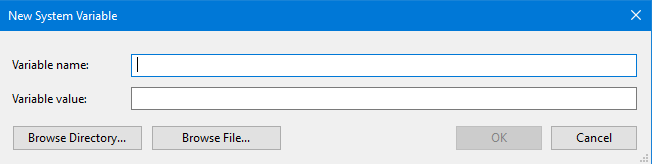
12d Synergy Support will provide you with the values of Variable name and Variable value. Enter them in the Variable name and Variable value boxes, respectively.
Click the OK button.
The environment variable is created.
How to Add an Environment Variable
- Published on May 22, 2026
- 1 minute(s) read
Was this article helpful?