Open the required drawing in your CAD application (AutoCAD or BricsCAD).
In the command line, run the command ETRANSMIT.
Adjust the Etransmit settings.
Do one of the following:
If you are using AutoCAD, modify the Transmittal Setup in the Modify Transmittal Setup prompt and ensure the settings shown in the image below are selected, at a minimum.
.jpg)
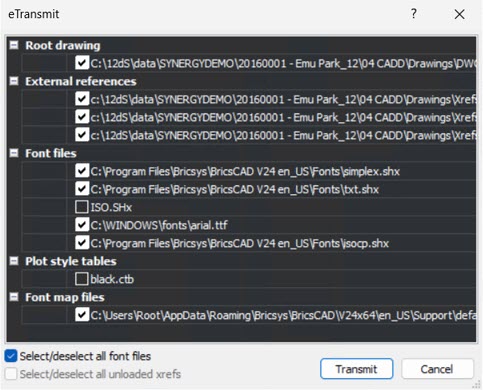
If you are using BricsCAD, select Edit from the top menu bar to edit the Etransmit. In the eTransmit prompt, select the Select/deselect all font files and select/deselect all the unloaded xrefs (if applicable) checkboxes as shown in the image below.
Generate the Etransmit .zip file and save it on your local machine.
Upload the Etransmit output .zip file to the 12d Synergy Support ticket, as requested.
How do I package an Etransmit in CAD applications
- Published on Nov 6, 2026
- 1 minute(s) read
Was this article helpful?